Cherry keyboard switches are widely recognized for their reliability, precision, and smooth performance. Whether you’re a professional typist, avid gamer, or casual computer user, understanding the types and functions of these switches can enhance your typing experience and help you choose the best keyboard for your needs.
What Are Cherry Keyboard Switches?
Cherry keyboard switches are mechanical switches developed by the German company Cherry GmbH, first introduced in the 1980s. Unlike membrane keyboards, mechanical switches provide tactile feedback and improved durability. Cherry switches are popular for their consistent actuation force, long lifespan—rated for over 50 million keystrokes—and precise response, which appeals to both gamers and typists.
These switches come in three primary categories: linear, tactile, and clicky. Linear switches offer smooth keystrokes without tactile feedback. Tactile switches provide a noticeable bump at the actuation point, aiding typing accuracy. Clicky switches combine tactile feedback with an audible click, favored by users who enjoy audible confirmation for each keypress. Studies from Keychron indicate that switch preference significantly impacts typing speed and gaming performance, making it crucial to select the right switch for your use case.
How Do Cherry Switches Work?
Cherry switches function using a spring and slider mechanism. Pressing a key pushes the slider down, compressing the spring, and completing an electrical circuit, registering the keystroke. The feel of the key depends on the switch type: linear switches have no bump, tactile switches include a tactile bump, and clicky switches feature a tactile bump plus a click sound.
The actuation force and travel distance vary among models. For instance, Cherry MX Red switches require 45g of actuation force, while Cherry MX Blue switches require 50g, providing a firmer typing experience. The precise engineering allows for faster response times, crucial for gaming, where milliseconds matter. Research from Kinetic Labs shows that tactile and clicky switches can reduce typing errors by up to 15% in everyday use. Users often select switches based on typing style, hand strength, and desired sound profile, making Cherry switches versatile for different scenarios.
What Are the Different Types of Cherry Switches?
| Switch Type | Feel | Sound | Popular Use |
| Linear (e.g., MX Red, MX Black) | Smooth keystroke | Quiet | Gaming, fast typing |
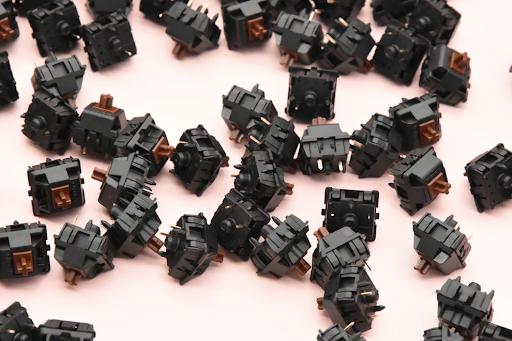
| Tactile (e.g., MX Brown, MX Clear) | Noticeable bump | Soft | Typing, coding, office work |
| Clicky (e.g., MX Blue, MX Green) | Bump + audible click | Loud click | Typing enthusiasts, feedback-driven work |
Linear switches are favored by gamers due to their smooth actuation and minimal resistance. Tactile switches are versatile, ideal for both typing and gaming. Clicky switches are preferred in office setups or by typists who enjoy auditory feedback. Each switch type also comes in variations like speed, silent, or low-profile versions, catering to different ergonomic needs.
Real user reviews on Keychron highlight that tactile switches reduce typing fatigue over long sessions, while linear switches improve reaction times in fast-paced games. Knowing the distinctions helps users select switches tailored to their lifestyle and workspace.
Which Cherry Switch Is Best for Gaming or Typing?
Choosing the right Cherry switch depends on your primary activity. For gaming, linear switches like MX Red or MX Speed Silver are ideal due to minimal resistance and smooth keystrokes, allowing rapid repeated key presses. Competitive gamers often report faster response times and fewer missed inputs with these switches.
For typing, tactile or clicky switches are recommended. MX Brown provides a gentle bump for typing accuracy without excessive noise, while MX Blue delivers tactile and auditory feedback, enhancing typing satisfaction. A study from Kinetic Labs indicates typists using tactile switches make fewer errors and experience improved typing speed over long durations.
Scenario-based selection:
· Office work: MX Brown or MX Silent Red to reduce noise and prevent fatigue.
· Gaming setup: MX Red or Speed Silver for fast key presses.
· Typing enthusiasts: MX Blue for satisfying feedback and rhythm.
Switch preference is subjective, and testing different switches in real-world scenarios is advised. Many users benefit from keyboard switch samplers to try different options before committing to a full keyboard.
How to Maintain and Improve Your Cherry Switch Keyboard?
Maintaining Cherry switches ensures longevity and consistent performance. Regular cleaning prevents dust and debris from affecting keypresses. Keycaps can be removed for deep cleaning, and compressed air or microfiber cloths help maintain the switches. Lubricating mechanical switches can reduce scratchiness and enhance smoothness, particularly for linear switches.
Avoid spilling liquids, and consider keyboard covers if you eat or drink near your workstation. Additionally, using a wrist rest and ergonomic setup reduces strain during long typing sessions. Research shows proper maintenance and ergonomics can extend keyboard lifespan and improve user comfort.
Conclusion
Cherry keyboard switches offer precision, durability, and a tailored typing experience for gamers, professionals, and enthusiasts alike. By understanding the types, actuation mechanisms, and use cases, users can select the ideal switch to enhance both productivity and gaming performance. Proper maintenance ensures long-lasting performance, making Cherry switches a reliable choice for years to come.
FAQs
Are Cherry MX Red switches better than Brown for typing?
Linear MX Red switches are faster for gaming, but tactile MX Brown switches are generally preferred for typing due to feedback and reduced typing fatigue.
Can I replace Cherry switches on any mechanical keyboard?
Not all keyboards are hot-swappable. Ensure your keyboard supports switch replacement before attempting to change switches.
How long do Cherry keyboard switches typically last?
Cherry switches are rated for over 50 million keystrokes, offering long-term durability for heavy use.

Apex Backlinks is the brand behind your backlink success. 2k+ Authors and 5k+ Quality Admin Deal Sites.