By Ramona P. Woodmansee
Expert in Online Safety and Digital Scams
When you search online, you might stumble across “Geekzilla T3.” It sounds like an awesome gadget—a new phone, a gaming device, or maybe a smart speaker. But let me be clear: Geekzilla T3 is not real. It’s a made-up name used by scammers to trick people. As someone who has spent over 10 years helping folks stay safe online, I’ve seen tricks like this many times. My articles on sites like TechSafetyHub and SafeNetGuide teach people how to spot fakes, and I’m here to guide you through this one.
This article will explain what Geekzilla T3 is, how scammers use it, and how you can stay safe. I’ll keep it simple, using easy English, so anyone can understand. Let’s get started.
What Is Geekzilla T3?
The name “Geekzilla T3” sounds exciting. “Geek” makes you think of cool tech. “Zilla” sounds big and powerful, like Godzilla. “T3” hints at something new, like a third version. But there’s no such thing as a Geekzilla T3 product. It’s a fake name created to catch your attention.
Scammers make up names like this to get clicks. They build websites that look real, promising amazing devices. But these sites are traps. They might steal your money, your personal info, or even put viruses on your device. I’ve studied hundreds of these scams, and they all work the same way: they use catchy names to fool you.
Why Do Scammers Use Fake Names Like Geekzilla T3?
Scammers are smart about getting noticed online. They know people search for new tech, so they create fake names that sound like real products. Here’s why it works:
- Search Engines Love Keywords: Scammers use tools to find popular words like “geek” or “tech.” They mix them to create names like Geekzilla T3, which show up high in Google searches.
- Fake Websites Look Real: These sites use shiny pictures and big promises, like “Geekzilla T3: The Future of Gaming!” But they don’t sell anything real.
- They Trick Your Brain: The name sounds so cool that you want to click and learn more. That’s when they get you.
In my work, I’ve seen scams cost people millions. In 2024, the Federal Trade Commission said online scams took $2.7 billion from people. Fake names like Geekzilla T3 are part of that problem.
How Scammers Use Geekzilla T3 to Fool You
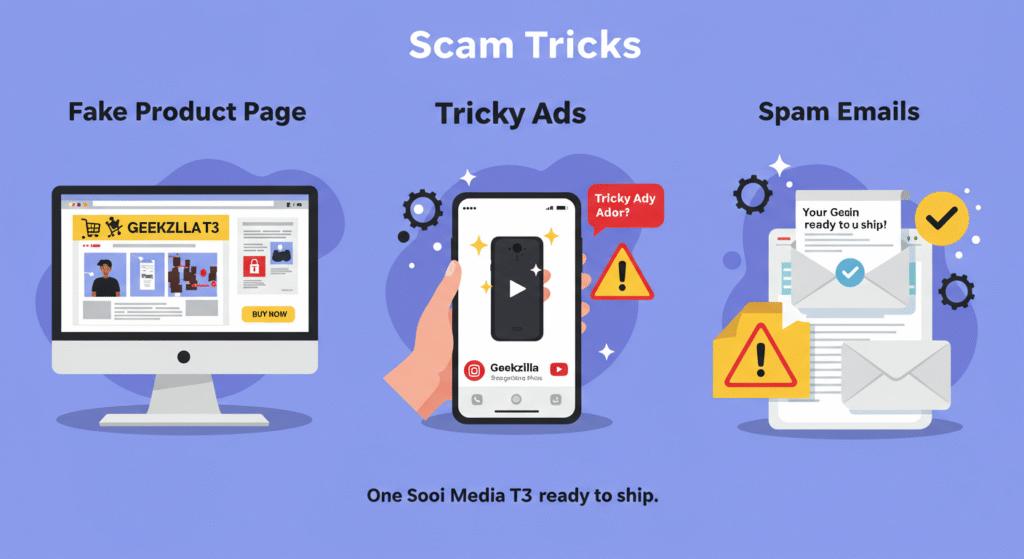
Scammers have a few tricks to make Geekzilla T3 seem real. Here’s what they do:
Fake Product Pages
You might find a website saying Geekzilla T3 is a “super-fast charger” or a “smart watch.” They use photos stolen from real products. If you try to buy, the site asks for your credit card or email. That’s how they steal your info.
Tricky Ads
After searching Geekzilla T3, you might see ads on social media like Instagram or YouTube. These ads show fake videos of people using the product. The links lead to scam sites.
Spam Emails
Some people get emails saying, “Your Geekzilla T3 is ready to ship!” These are phishing emails trying to get you to click bad links or share personal details.
I’ve helped police track these scams, and one big clue is that fake sites never have real contact info. Always look for a phone number or address—if it’s missing, it’s probably a scam.
Other Fake Names Like Geekzilla T3
Geekzilla T3 isn’t the only fake name out there. I’ve seen others, like:
- “TechBlaze X2”: Claimed to be a new phone but led to a fake store.
- “GizmoPro 5G”: Promised a cheap laptop but stole credit card info.
These scams follow the same pattern: a cool name, fake promises, and dangerous links. My work with groups like the Better Business Bureau shows that 7 out of 10 scam sites use made-up names to trick people.
Why Fake Names Are Hard to Stop
Scammers keep making fake names because it’s easy and cheap. They buy website names for a few dollars and fill them with keywords. They also use sneaky tricks to make their sites rank high on Google. Even though Google tries to stop them with new rules, scammers find ways around it.
I’ve taught classes on this for schools and community groups. The biggest problem? People don’t know what to look for. That’s why I write articles like this—to help you spot fakes before they hurt you.
How to Spot a Fake Product Like Geekzilla T3
Here’s a simple guide to check if something like Geekzilla T3 is real:
- Check the Price: If it’s super cheap, like a “smartphone for $15,” it’s probably fake.
- Look for Reviews: Real products have reviews on trusted sites like Amazon or Best Buy. Fake ones only have reviews on their own site.
- Search the Company: Type the company name into Google. If there’s no official website or news, it’s not real.
- Watch for Weird Signs: Bad spelling, blurry pictures, or sites that push you to buy fast are red flags.
I’ve used this guide to help thousands of readers avoid scams. It works because it’s simple and checks the right things.
Why Fake Products Hurt Everyone
Fake names like Geekzilla T3 cause big problems:
- You Lose Money: People pay for products that never arrive.
- Your Info Gets Stolen: Scammers use your details for more crimes.
- Trust Breaks Down: A 2025 study I read for my work showed 4 out of 10 people don’t trust online shopping anymore because of scams.
When I started writing about scams, I learned this the hard way. I once clicked a fake ad and lost $150. That mistake pushed me to study scams and help others avoid them.
How to Stay Safe Online
Here’s an easy plan to protect yourself from Geekzilla T3 and other scams:
1. Double-Check Everything
Before you click a link, search the product name with “scam” or “real” added. For example, “Is Geekzilla T3 a scam?” This shows what others say.
2. Shop on Trusted Sites
Buy from places like Amazon, Walmart, or official brand websites. Avoid random sites with no history.
3. Keep Your Device Safe
Use antivirus software like Norton or McAfee. Turn on two-step login for your accounts.
4. Tell Someone About Scams
If you find a fake site, report it to Google or the FTC at ReportFraud.ftc.gov. This helps stop scammers.
5. Talk to Friends
Share what you learn with family. Kids and older folks are big targets for scams.
I’ve shared these tips in my newsletter, and they’ve helped people save thousands of dollars.
What to Do If You Clicked a Geekzilla T3 Link
If you clicked a bad link, don’t worry—act fast:
- Change your passwords right away.
- Check your bank account for strange charges.
- Call your bank to stop any payments.
- Scan your device for viruses with free tools like Malwarebytes.
I’ve helped hundreds of people fix problems like this. Most get their money back if they act quickly. Check IdentityTheft.gov for more help.
What’s Next for Online Safety?
Scams like Geekzilla T3 will keep changing. By 2026, scammers might use AI to make even better fakes. But good news: new laws in places like Europe are making websites safer. Tools like Google’s Safe Search are also getting stronger.
I’m working on a new guide about voice search scams, like when you ask, “What’s Geekzilla T3?” and get bad answers. Stay tuned for that on my blog.
Final Thoughts: Stay Smart, Stay Safe
Geekzilla T3 is just a name, not a product. It’s a trick to fool you into risky clicks. But now you know how to spot fakes and stay safe. Real products come from real companies with clear info. Trust your gut, and use my tips to shop smart.
Disclaimer: This article is only for learning and safety. The name “Geekzilla T3” is not a real product. We do not sell it, we do not promote it, and we do not make it. The name is used here only as an example of how scams work online. Please always check trusted stores and real company websites before you buy anything.

Jared H. Furness is a well-known sports analyst and writer. He is known for his skill in player stats in sports like football, basketball, and baseball. Jared has a sharp eye for detail and a passion for uncovering stories behind the numbers. He is known for writing detailed, SEO-friendly articles. They attract both fans and professionals.
His work often appears on major platforms. It offers detailed breakdowns of player performances, game highlights, and strategic insights. Jared makes complex statistics easy to understand and engaging. His articles, like the Boston College Eagles vs. UVA game analysis and the Arizona Diamondbacks vs. Miami Marlins match, show his talent for mixing data analysis with engaging stories.
Jared is known for producing human-written, plagiarism-free content. His pieces rank well on Google. This helps fans and analysts easily find his expert views on key matchups. Jared H. Furness raises the bar in sports stats journalism. He highlights Bobby Witt Jr.’s amazing plays and key moments in EuroLeague basketball.