Centralizing camera feeds on a single TV screen brings order and convenience to everyday monitoring. Many households and small businesses rely on multiple cameras, and switching between apps or devices can become time-consuming. A unified display helps people quickly understand what is happening across different areas without juggling several screens. This approach also reduces the risk of missing important activity simply because the feed wasn’t open at the right moment. In this article, the main viewing methods are compared to help identify the best setup.
The Direct Method: Using an HDMI Cable from Your NVR/DVR
Connect Your Recorder Directly to the TV
Connecting a recorder directly to a TV through an HDMI cable is often the simplest method. Once connected, the TV immediately becomes a large, clear monitoring display without relying on additional apps or wireless networks. This setup works especially well in living rooms, offices, or security desks where the TV remains on for long periods. The process involves plugging in the HDMI cable, selecting the correct input, and confirming the recorder’s output settings. This straightforward arrangement is often preferred for its stability and ease of setup.
Navigate the On-Screen Live View and Playback
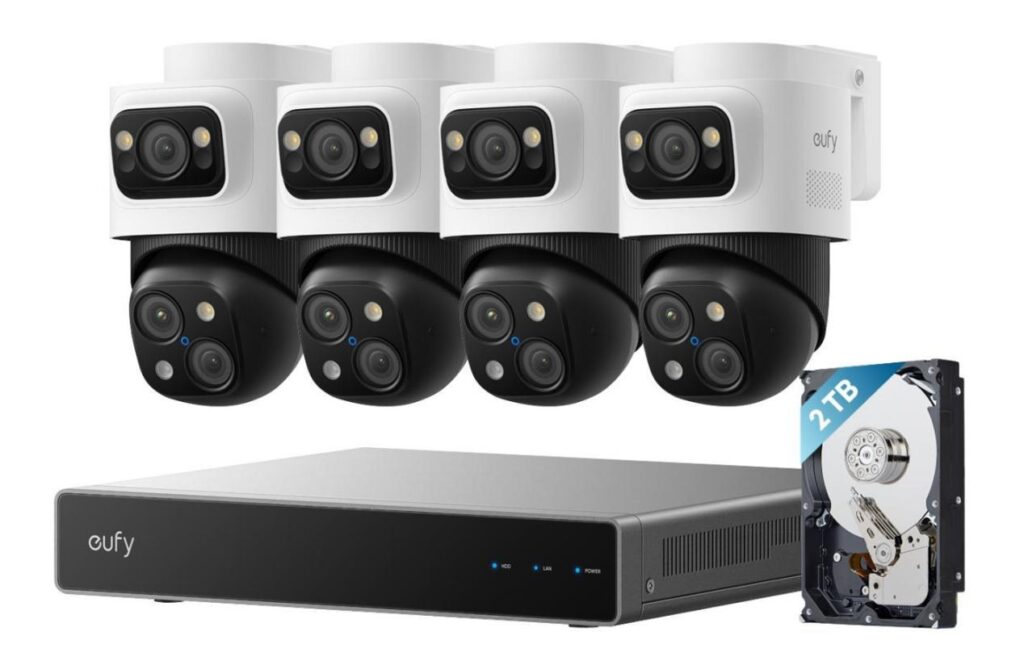
Most recorders offer a built-in interface that displays multiple cameras in a grid layout. Users can switch between live view and playback using the recorder’s remote control or front panel buttons. This structured interface is designed to make navigation intuitive, even for those who are not familiar with advanced security equipment. Some recorders also support customizable layouts, allowing certain important areas to be shown larger than others. This balance of simplicity and control is what makes a well-integrated NVR camera system—such as those offered by eufy—a practical choice for managing continuous, multi-day recording with ease.
The Streaming Method: Using a Media Streaming Device
Cast Camera Feeds via Chromecast or Apple TV
Although the heading references casting devices, the general idea is to mirror video streams from a mobile device to a television using any supported casting feature. This method works well for households that want flexibility without additional cabling. Live camera feeds can be opened in an app and then mirrored wirelessly to the TV, providing a large viewing area with minimal installation. Wireless casting is convenient for casual, temporary monitoring needs. However, the quality of the feed depends heavily on the stability of the home Wi-Fi network.
Use a Dedicated App on a Smart TV or Gaming Console
Many smart TVs and entertainment systems offer downloadable apps that allow camera feeds to be displayed directly. With these apps, the TV can act as an independent monitor without relying on phones or computers. This setup works best when the TV is already connected to the network and placed in a room where monitoring needs to be frequent. Organizing cameras within the app makes it easy to switch between single-camera views and multi-camera layouts. Although performance varies across devices, the convenience of app-based viewing appeals to many households. This option also helps reduce screen clutter because everything is accessed through a single interface.
The Professional Method: Using a Video Decoder or HDMI Splitter
Decode Multiple IP Camera Streams for a TV Wall
A video decoder can handle multiple IP camera streams and output them to a TV in a clean, synchronized layout. This method is typically used in environments where constant monitoring is necessary, such as offices or small business control rooms. With a decoder, the TV receives direct network video streams without needing an NVR interface or mobile app. This provides smooth playback and low latency when the network is properly configured. While more advanced, this setup gives users a highly reliable, always-on monitoring system. It also scales well when more cameras are added over time.
Arrange Camera Feeds in Custom Layouts
Decoders and splitters often allow flexible arrangement of video windows. Users can place critical camera feeds in larger sections of the screen while leaving less active areas in smaller windows. These layout options help prioritize high-traffic locations such as front doors or driveways. The system can also rotate between different layouts automatically to ensure balanced visibility across all areas. This kind of customization is helpful for users who monitor complex spaces with varying security needs. Although it requires more setup, the result is a clean and efficient viewing station.
Key Considerations for a Smooth Viewing Experience
Ensure Network Stability for Wireless Setups
Wireless setups rely heavily on consistent network performance. A weak connection can cause delays, frozen frames, or incomplete streaming when multiple cameras transmit high-resolution footage simultaneously. Improving router placement or upgrading to a stronger network environment often brings significant improvements. For homes with many connected devices, dedicating a specific frequency band to security streaming can reduce congestion. Ensuring overall network health helps maintain stable viewing, especially when casting or using smart TV apps. This simple check often prevents many common playback issues.
Optimize Display Layout and Camera Order
Arranging the viewing layout thoughtfully can greatly enhance awareness. Placing entry points, driveways, or hallways in the most prominent positions ensures important activity is never overlooked. Consistent camera order also helps users memorize the screen more easily, making it quicker to understand what each feed represents. Adjusting brightness and contrast on the TV may further improve visibility, especially in low-light camera scenes. When multiple users share the system, labeling cameras clearly helps everyone stay oriented. Small layout adjustments can transform a cluttered screen into a clear and efficient viewing dashboard.
Conclusion
Several methods make it possible to watch all security camera feeds on one TV screen, ranging from simple HDMI connections to advanced decoding solutions. Each approach serves different needs depending on how often monitoring occurs and how many cameras are involved. Some households prefer wireless convenience, while others prioritize stability or professional-level control. Evaluating available devices, room layout, and network conditions helps determine which method fits best. A unified TV display ultimately enhances awareness, reduces complexity, and brings greater peace of mind in daily monitoring.

Jared H. Furness is a well-known sports analyst and writer. He is known for his skill in player stats in sports like football, basketball, and baseball. Jared has a sharp eye for detail and a passion for uncovering stories behind the numbers. He is known for writing detailed, SEO-friendly articles. They attract both fans and professionals.
His work often appears on major platforms. It offers detailed breakdowns of player performances, game highlights, and strategic insights. Jared makes complex statistics easy to understand and engaging. His articles, like the Boston College Eagles vs. UVA game analysis and the Arizona Diamondbacks vs. Miami Marlins match, show his talent for mixing data analysis with engaging stories.
Jared is known for producing human-written, plagiarism-free content. His pieces rank well on Google. This helps fans and analysts easily find his expert views on key matchups. Jared H. Furness raises the bar in sports stats journalism. He highlights Bobby Witt Jr.’s amazing plays and key moments in EuroLeague basketball.